Add Banner 468x60 px

make widget

Samsung Galaxy S3, Smartphone Dengan Prosesor quad-core Exynos 1,4GHz Resmi Diluncurkan

After a long wait, finally released Samsung Android Smartphone lively discussed today, the Samsung Galaxy S3. Launch of the Smartphone is equipped with 4.8-inch super AMOLED Display is berlanglung in London today. According to the rumors, Samsung Galaxy S3 equipped with a mobile processor power than they established themselves, quad-core 1.4 GHz Exynos. Not just from ssi processor only, the latest Samsung smartphone design even this admirable. Smartphone thickness is only 8.6 mm with a weight of 133 gr.

This is default featured post 2 title

Go to Blogger edit html and find these sentences.Now replace these sentences with your own descriptions.This theme is Bloggerized by Lasantha Bandara - Premiumbloggertemplates.com.

This is default featured post 3 title

Go to Blogger edit html and find these sentences.Now replace these sentences with your own descriptions.This theme is Bloggerized by Lasantha Bandara - Premiumbloggertemplates.com.

This is default featured post 4 title

Go to Blogger edit html and find these sentences.Now replace these sentences with your own descriptions.This theme is Bloggerized by Lasantha Bandara - Premiumbloggertemplates.com.

This is default featured post 5 title

Go to Blogger edit html and find these sentences.Now replace these sentences with your own descriptions.This theme is Bloggerized by Lasantha Bandara - Premiumbloggertemplates.com.

Showing posts with label Tips-Trik. Show all posts

2012/05/23

Mikrotik Hotspot Router Hacking Tips


One more way is to surf free hacking mikrotik hotspot. Usually when we connect with mikrotik hotspot then we will be faced with a menu mikrotik login before you can browse.

This is a way to make mikrotik login pass-by, is actually more appropriate if the client is called cloning. The point is we do not have to login to be able to browse, because the target has been logged. We as his clone so no need to login. This trick can only work for a client that we are still connected to the hotspot clone.Here are the steps:
A. Download first Netcut program, this program is to determine the MAC address is connected with us.

    
Netcut can be downloaded here.2. Connect our computer with mikrotik hotspot3. Run the program Netcut4. Select LAN Card / NIC that we use by clicking on the Choice menu NetCard

    
[Mikrotik hack 0]
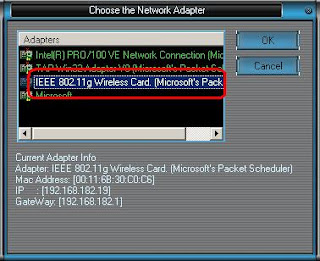


5. Then click OK again to the main screen, select one of the connected network. Which is clearly not

    
our network or network server.
    
[Mikrotik hack 1]


6. Copy the IP address and MAC address, you can also click PrintTable then block and copy paste

    
to a notepad for the next step.
    
[Mikrotik hack 2]


7. After dipaste next step in notepad edit the MAC address, in this example

    
[00:26:5 E: 60:81:1 C]. Remove the [:] to be 00265E60811C. This value which we will

    
use to change the MAC address.


8. Next we disable our first wireless LAN. Then open the properties and change the value of wireless LAN

    
Local Administration MAC Network, default is empty. Fill with the above, in this example

    
00265E60811C
    
[Mikrotik hack 3]


9. Then we set our IP wireless LAN with the same IP is 192.168.182.18 and complete DNS

    
server address.
    
[Mikrotik hack 6]


 For the DNS server address can be checked before we change MAC and IP. So the first time we
      connected to a hotspot, by typing the command from the command prompt
      C: \> ipconfig / all


10. The final step is re-enable our wireless LAN. Now we can browse without

      
must have permission from the hotspot.

11. Results:

      
Before performing the clone
      
[Mikrotik hack 7]


After doing a clone
        
[Mikrotik hack 8]


This tutorial is only for those who are lazy to ask username and password on the admin network





2010/05/22

Tips Cara melindungi Artikel Dari Pembajakan ( Copy Paste )

Berikut ini adalah cara sederhana khusus bagi anda yang ingin melindungi seluruh artikel-artikel yang ada di blog anda agar tidak dapat di copy paste oleh pihak lain, tapi untuk saya pribadi, saya lebih memilih untuk mempersilahkan bagi para pengunjung yang ingin mengutip/ meng-copy paste artikel di blog ini jika itu bermanfaat dan bernilai positif, asal tidak lupa menyertakan sumbernya. Baik sekarang kita langsung saja, caranya sebagai berikut :
- Sebelumnya Login dahulu  ke Dasbor;
- Klik tab Tata Letak;
- Pilih tab Edit HTML;
- Tandai kotak Expand Template Widget;
- Cari kode ;  jika tidak bisa  gunakan kode ini  
- Copy paste script di bawah ini, letakkan tepat setelah/dibawah ;


- Setelah selesai klik Simpan Template;
- Selesai.

Coba sekarang lihat postingan blog kamu, terus kamu copy paste.

Gimana hasilnya tidak bisa di copy paste kan !!!
sumber :  http://chyardi.blogspot.com/2010/01/tips-cara-melindungi-artikel-dari-copy.html
Selamat mencoba.


2010/05/15

Penyebab Akun Facebook Disuspend/Dihapus


Akun Facebook kadang disuspend (dibekukan/ditutup/dihapus) karena berbagai macam hal. Tapi kebanyakan diblokir karena teramat sangat aktif sekali komentar, sehingga dianggap sebagai spammer. Anda akan mendapat peringatan dengan tidak bisa memberi komentar di webnya (tp masih bisa di versi mobile). Setelah beberapa hari biasanya akan dibuka suspendnya. Namun jika masih sering over memberi komentar maka akan langsung dihapus.

Penyebab akun Facebook disuspend:

* Terlalu banyak komentar.
* Terlalu banyak berkirim ke wall seseorang/group.
* Bergabung dengan banyak grup (lebih dari 200).
* Mengunakan nama palsu.
* Berteman dengan terlalu banyak orang (hati2 jika mendekati 5000 orang).
* Memalsukan nama sekolah/kuliah/kantor dsb.
* Terlalu banyak poke.
* Membuat pesan yang sama persis(copy paste) dan dikirim ke banyak orang.
* Menulis konten yang bersifat offensif.


Jika Facebook kamu diblokir, coba untuk mengirimkan email ke disabled(at)facebook.com atau appeals(at)facebook.com atau info(at)facebook.com yang berisi pertanyaan mengapa akun FB disuspend. Tentunya memakai bahasa Inggris untuk berkirim imelnya. Setelah Anda mengirim email maka akan ada balasan dari Facebook berisi link ke Term Of Use mereka. Klik alamat link tersebut. Setelah beberapa hari akun akan dibuka kembali.

Setelah dibuka lebih baik membatasi dalam berkomentar. Karena bisa-bisa dihapus kembali akunnya.Akan lebih susah untuk mengaktifkan lagi. Kemarin sudah menemukan 3 kasus disuspend, siapa tahu besok Anda
yang kena hehe.... :-D


sumber :  http://darmawanku.blogspot.com

2010/02/27

Kode Smiley Emotion Chat Facebook


Agar lebih asik, saat chat di Facebook Anda dapat menambahkan smiley dengan menulis kode tertentu. Postingan ini sebenarnya sudah pernah saya tulis di blogspot. Berikut ini dimuat ulang dengan penambahan kode yang lebih lengkap. Nambah satu sebenarnya:D  


happy :-) :) :] =) robot :| ]
curly lips :3
pacman :v
upset >:O >:-O >:o >:-o
confused o.O O.o
squint -_-
kiki ^_^
heart <3
kiss :-* :*
angel O:) O:-)
devil 3:) 3:-)
pinguin <(“)
shark (^^^) unsure :/ :-/ :\ :-\
cry :’(
grumpy >:( >:-(
sunglasses 8-| 8| B-| B|
glasses 8-) 8) B-) B)
wink ;-) ;)
gasp :-O :O :-o :o
grin :-D :D =D
tongue :-P :P :-p :p =P
sad :-( :( :[ =(
Chris Putnam :putnam:
Selamat bercengkrama

sumber : "http://darmawanku.com/2009/12/23/kode-smiley-emotion-chat-facebook/ "

Share

Twitter Delicious Facebook Digg Stumbleupon Favorites More